3D Training Tools That Run in Any Browser
Interactive safety simulations, hazard finders, equipment training, procedure walkthroughs, maintenance workflows, and onboarding. No VR headset, no app.
PDFs and Videos Don't Stick
Most EHS training follows the same pattern: watch a video, click through a quiz, get a certificate. The information is technically delivered. But when it involves spatial awareness (where the exits are, what the equipment looks like inside, which panel opens first) flat materials don't cut it.
People learn spatial information by moving through space. When the real space isn't available, or when safety concerns make practice risky, a 3D simulation is the next best thing. Instead of checking a compliance box, your team actually builds the awareness that prevents incidents.
There's a second problem with traditional training: it assumes the trainer, the trainee, and the equipment can all be in the same place at the same time. Multi-site companies run the same orientation differently at every location. Equipment gets pulled out of production for training days. New hires wait weeks for the next scheduled session. A simulation removes the scheduling problem entirely, the training is just there, at a link, identical at every site, available the day someone signs their contract.
Where 3D Training Earns Its Keep
Manufacturing and logistics. Forklift awareness, machine guarding, lockout/tagout, warehouse traffic routes. The cost of practicing on real equipment is downtime; the cost of not practicing is an incident report. A simulation costs neither.
Property and housing. Fire safety, evacuation routes, hazard awareness for residents and staff. Our fire safety hazard finder for Empiric came from exactly this: orientation talks that nobody remembered by move-in day.
Field service and maintenance. Procedure walkthroughs for equipment your technicians see rarely but must service correctly. An interactive 3D service manual beats a 90-page PDF in a van.
EHS and compliance teams. Annual recurrent training that people click through is a liability dressed up as a checkbox. Interactive scenarios with decisions and consequences produce engagement you can see in the completion data, and defend in an audit.
Why Browser-Based, Not VR
VR headsets are great for immersion, but they create logistics problems. Browser-based 3D skips all of that.
No Extra Hardware
Runs on any laptop, tablet, or phone.
Instant Rollout
Share a link. No downloads, no IT setup.
LMS-Ready
SCORM/xAPI. Tracks completions automatically.
Multi-Location
Same training at every site. No instructor variance.
The practical difference shows up in deployment. A VR program means buying headsets, charging them, updating their firmware, sanitizing them between users, tracking which site has how many, and scheduling people onto shared devices. A browser simulation means sending a link. If your LMS can host a SCORM package, the rollout is the same as any other course.
It also shows up in who completes the training. Headsets sit in a cabinet at one site while the night shift at another site never gets a turn. Some people get motion sick, some wear glasses that don't fit comfortably, some simply refuse to put on a shared device. A browser tool meets people on hardware they already use every day, which is why completion is rarely the bottleneck.
To be fair to VR: when the training goal is physical muscle memory, like crane controls or hand placement on a machine, headsets and controllers earn their overhead. For spatial awareness, hazard recognition, and procedure knowledge, which is most workplace training, a browser does the job without the logistics. The 3D models we build are the same quality either way, the same kind we use in product configurators for sales teams.
Empiric: Fire Safety Hazard Finder
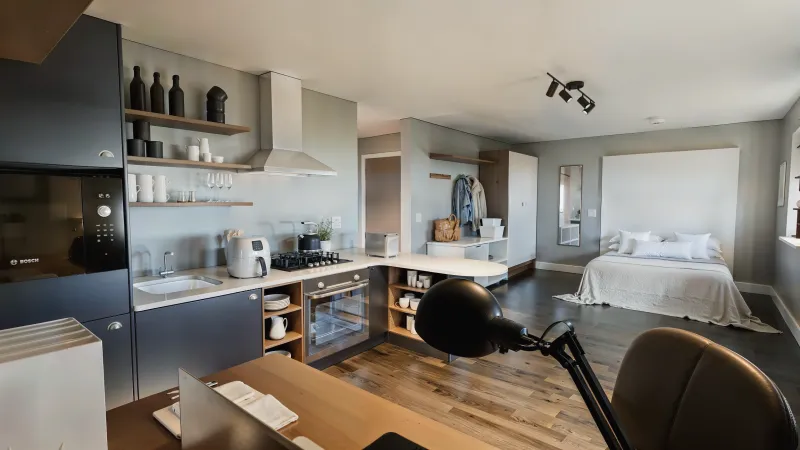
Empiric develops and manages student housing across Europe. Their challenge: fire safety training for new residents. The standard approach was a PDF or a quick orientation talk. By move-in day, most students had forgotten all of it.
We built an interactive 3D walkthrough of a student living space where residents spot fire hazards themselves. Instead of reading about what not to do, they actively explore the environment and learn why each hazard matters. What was a boring compliance step became something people actually engaged with.
How a Training Scenario Gets Designed
A scenario starts with a question your safety or training team already knows the answer to: what do people get wrong? For a hazard-recognition scenario, that means listing the hazards that actually show up in your incident reports or inspection findings, not a generic textbook set. For a procedure scenario, it means writing out the steps, the order they must happen in, and the mistakes that matter most.
From that list we scope the scenario: which environment to model, which hazards or steps to include, and how each one is scored. Scoring is usually simple and deliberate. A found hazard, a missed hazard, a step done out of order. Each gets a point value your team agrees on, so the final score means something to you, not just to us.
Then we iterate. The first playable version goes to a handful of real trainees, and their confusion is data: hazards nobody finds get visual adjustments, steps everyone breezes past get harder or get cut. The Empiric fire safety finder went through exactly this loop, with hazards placed and tuned based on what residents actually overlooked. Scoping and building it works like any of our custom 3D development projects: fixed quote, weekly check-ins, your approval at each stage.
What Training Tools Can Include
Interactive 3D tools tailored to your environment, your equipment, your procedures, and your compliance requirements.
Onboarding Simulations
New-hire safety orientation and annual recurrent training. Walk new employees through the facility, hazards, and procedures before their first day on the floor.
Equipment Training
Forklifts, industrial trucks, tow vehicles, machinery. Trainees explore the equipment and practice procedures in 3D before operating the real thing.
Procedure Walkthroughs
Lockout/tagout, PPE protocols, maintenance workflows, inspection routines, and other step-by-step procedures that track completion automatically.
Incident Review & Root Cause Analysis
Recreate incident scenes in 3D so teams can walk through what happened, identify the root cause, and train on prevention, without being on-site.
Emergency Response
Spill procedures, fire evacuations, threat scenarios. Practice emergency response in a realistic 3D environment where mistakes don't have real consequences.
Full Handoff
You own the final deliverables listed in the proposal, including SCORM/xAPI exports when needed. No required subscription platform.
How a Project Works
Most training simulations go from first conversation to live in 8 to 14 weeks. Every project is custom 3D development, scoped around your environment and learning goals. Here's what to expect.
Discovery Call
You walk us through the training challenge: what needs to be taught, who the learners are, and what's not working with the current approach. We'll ask about your environment, your LMS, and any compliance requirements. About 30 minutes.
Proposal & Learning Design
We send a scope document with the simulation concept, the learning objectives it covers, the timeline, and the cost. Fixed price, no hourly billing. We work with your training or L&D team to make sure the content is accurate.
3D Environment & Scenario Building
If you already have 3D models or floor plans, we work with those. If not, we create the environment from photos, blueprints, or site visits. You review progress in your client portal, leave feedback directly on the 3D scenes, and approve each stage before we move on.
Testing & LMS Integration
Your team tests the simulation on different devices. We deliver it as a SCORM or xAPI package that your L&D team uploads to your LMS, so completions, scores, and time spent are tracked automatically. If you don't have an LMS, the simulation works standalone with a simple link.
Launch & Handoff
We deploy the simulation and hand over the final deliverables listed in the proposal, including the agreed code, 3D assets, and SCORM package if needed. Bug fixes are included for 3 months. After that, content updates and new scenarios are handled through FIGS in your client portal.
Measuring Completion and Retention
A simulation can record what a video can't: not just that someone pressed play, but what they did. Inside the scenario we can log scores, which hazards were found and which were missed, how many attempts someone took, time spent, and whether they finished. That data goes wherever you need it.
If you have an LMS, the cleanest setup is a SCORM or xAPI package. The simulation reports completion, score, and time to the LMS, and your LMS stays the system of record: it owns the trainee accounts, the certificates, the deadlines, and the audit trail. We don't duplicate any of that, and we don't hold your training records.
Without an LMS, the simulation can run standalone and log completions to a simple dashboard or export. One honest note on retention: the simulation can show you who engaged and how well they performed in the scenario, but proving long-term retention takes follow-up testing on your side. What we can promise is the data to start that conversation, instead of a spreadsheet of people who clicked "next" through a slideshow.
What Does It Cost?
Projects start at $4,999. Final pricing depends on the complexity of the environment, the number of scenarios, and whether you need LMS integration. You get a fixed quote upfront, no hourly billing, no surprises.
View Pricing Details3D Training Simulation FAQ
What is a 3D training simulation?
An interactive, browser-based environment where people practice procedures, explore equipment, or build spatial awareness before doing the real thing. Trainees move through a realistic 3D version of the facility, make decisions, and see consequences. Runs on any laptop, tablet, or phone.
Is browser-based 3D as effective as VR?
For most training goals, yes, and it's far easier to roll out. VR adds immersion but brings headset logistics, motion sickness for some users, and per-device costs. Companies typically reserve VR for high-stakes muscle-memory training and use browser 3D for everything else.
Does it integrate with our LMS?
Yes. We deliver SCORM or xAPI packages that upload to your existing LMS, so completions, scores, and time spent track automatically. No LMS? The simulation works standalone with a link.
What does it cost?
Projects start at $4,999 with a fixed quote. Unlike per-seat training platforms, there's no recurring license: you own the finished simulation and train unlimited people with it.
How long does a project take?
Most simulations go live in 8 to 14 weeks, depending on environment size and scenario count. The proposal includes a realistic timeline before anything starts.
Can scenarios be updated after launch?
Yes. Procedures change, layouts change, and regulations get revised. Bug fixes are included for 3 months after launch. After that, content updates, new hazards, or entirely new scenarios are handled through FIGS in your client portal, each with a quoted price before work starts. Since you own the code, your own developers can also make changes.
How many trainees can use it at once?
As many as you need. The simulation is a static web application, so it scales the way a website does. Ten people or a thousand people can open it during the same onboarding week, with no per-seat license and no extra cost.
More on this topic: how interactive 3D is used for training and education.
We Also Build
Map One Safety Procedure Into a Browser-Based Simulation
Tell us what your team needs to learn, where mistakes happen, and how you track completion today.
Get in TouchFree consultation · No obligations