Product Configurator Examples: 10 Real Configurators Worth Studying
Most roundups of product configurator examples are galleries of screenshots. You see a picture of someone else's tool, read a sentence about it, and move on. That's a strange way to study something whose entire point is interaction. A configurator only makes sense when you drag the slider yourself, watch the model update, and notice where the experience helps you or loses you.
So this list works differently. Every example here is a configurator you can open in a browser today. The first four are our own client projects, live and clickable, and the other six are well-known configurators from companies like BMW, Tylko, and Scania. For each one, I'll point out what it does well and what's worth borrowing if you're planning your own.
One note on scope: not every example here is a webshop widget. Some are sales tools that reps use in meetings, and one is a training game. That's deliberate. Configurators do their best work in more places than checkout pages.
A configurator only makes sense when you use it. Screenshots show what one looks like. They never show what one feels like, and the feel is the product.
Four you can try right now (our client work)
These four are projects we built at ComeFigure. You can open each one from the demos section on our homepage, no signup, no sales call. They're listed here not because they're ours but because you can actually use them, which is the whole premise of this article.
1. Hillrom (now Baxter): virtual hospital walkthrough
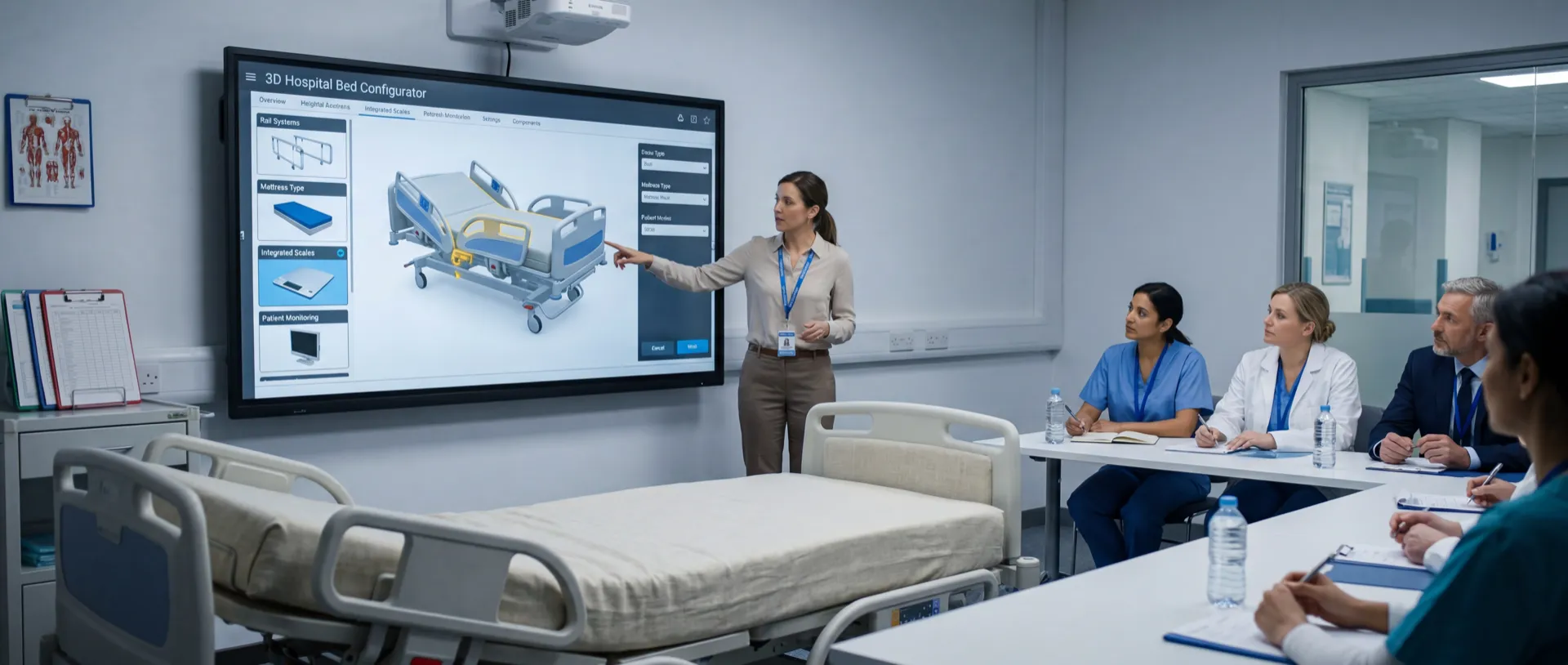
Hillrom manufactures hospital equipment, beds, patient lifts, and monitoring systems. The sales problem is physical: arranging on-site demos across multiple hospital departments is expensive and slow, and you can't ship a hospital bed to every meeting.
The tool we built is a virtual hospital walkthrough. Buyers navigate from the lobby into different rooms and explore products like the H900 bed in context, with cinematic video transitions between spaces. Sales teams walk clinicians through a hospital room in 3D instead of shipping equipment to demos, and every stakeholder on a buying committee can explore the equipment on their own schedule.
What to study: the use of environment. Most configurators show a product floating on a white background. This one shows the product where it will actually live, which is what a hospital buyer needs to evaluate. Try the Hillrom demo here.
2. QVIS: security camera configurator for dealers
QVIS is a security camera manufacturer that sells through resellers. Before the configurator, spec-ing a branded camera meant emails back and forth with a design department, and sometimes a wrong order at the end of it.
Now a dealer opens the 3D tool, uploads a logo, picks colors, and previews the branded camera before placing the order. The configuration the dealer builds is the order they place, so the tool doubles as a quoting front end. Dealers spec cameras visually, with the customer in the room, and the back-and-forth about color choices disappears.
What to study: the audience. This is a configurator for dealers, not consumers, and it shows how the same technology works as a B2B sales tool. Try the QVIS demo here.
3. Empiric: fire safety hazard finder
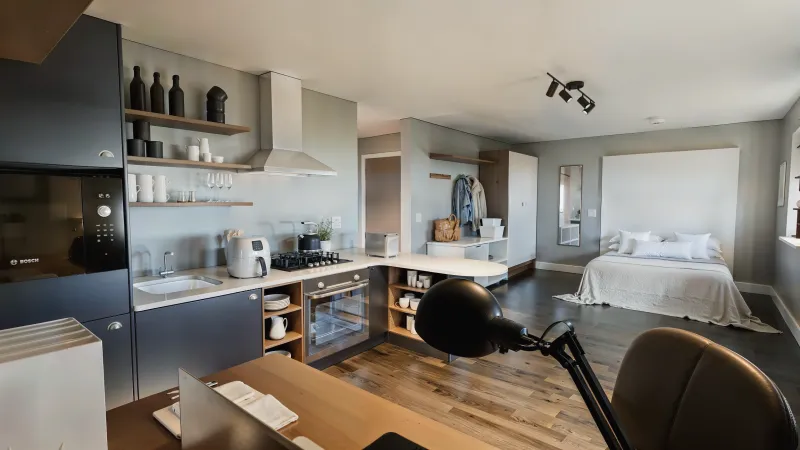
This one isn't a product configurator in the shopping sense. It's a training game, built with the same 3D toolset, and it's a useful reminder of how far the format stretches.
Empiric develops and manages student housing across Europe. Fire safety training for new residents used to be a PDF or a quick orientation talk, and by move-in day most students had forgotten all of it. We built an interactive 3D walkthrough of a student living space where residents spot fire hazards themselves. The hazards were placed and tuned based on what residents actually overlooked in early playtests.
What to study: engagement through interaction. People remember hazards they found, not hazards they were told about. Try the fire safety demo here.
4. Jordan Golf: selling a studio before it exists

Jordan Golf sells custom golf studios. The product a customer is buying doesn't exist yet, so there is nothing to photograph and nothing to visit. That's the purest case for a configurator there is.
We built a studio configurator where customers design their own setup, from the layout to the finishes, and see the result as they go. It changes the sales conversation: instead of describing options over the phone, the customer arrives with a configuration they already like, and the discussion starts from there.
What to study: configurators for made-to-order products. When there's no inventory to show, 3D isn't a nice-to-have, it's the only way to show the product at all. Try the Jordan Golf demo here.
Famous examples worth studying
These six are configurators from larger companies. Each one is live as of June 2026, and each teaches a different lesson.
A suggestion before you open them: don't just admire the visuals. Time how long the tool takes to load, try to build something invalid and see how the tool stops you, change an option and count the seconds before the model responds, and check whether you can save or share what you made. Those four checks tell you more about configurator quality than any feature list.
5. BMW: option dependencies at scale
BMW's Build Your Own tool is the reference point most people have for configurators, and the thing to study isn't the rendering, it's the logic. A car has thousands of valid option combinations and many more invalid ones. Pick a trim and the available wheels change. Pick a package and individual options inside it lock or unlock. The price updates with every choice.
BMW's configurator never lets you build a car that can't be manufactured. That dependency handling is the hardest part of any large configurator, and BMW is a free masterclass in how it should feel from the buyer's side.
6. Tylko: instant parametric resizing
Tylko, a Warsaw furniture company, sells made-to-order shelving through a configurator where you adjust width in 1 cm increments and the geometry rebuilds in real time. This isn't swapping a red model for a blue one. The shelf itself is regenerated as you drag, with the price updating alongside it, and you can preview the result in your room through their AR app.
What to study: parametric configuration. Tylko proves customers will happily design furniture down to the centimeter if the tool makes it feel effortless.
7. Nike By You: mass customization UX
Nike By You lets shoppers recolor a sneaker zone by zone, swoosh, laces, sole, and add a personal ID, with a 3D view that updates as they go. Each pair is then made to order.
What to study: how Nike keeps a deep customization flow simple. The options are presented one zone at a time, the shoe is always visible, and there's no way to get lost. If your product has many surfaces a customer can change, this is the navigation pattern to learn from.
8. Emerald Guitars: a small manufacturer doing full 3D
Emerald Guitars is a carbon fiber guitar maker in Ireland, nowhere near BMW's budget, and it runs a full 3D guitar builder on its site. Customers design a custom instrument, body style, finish, and hardware, and see it in 3D before committing to a build.
What to study: the existence proof. Small manufacturers often assume real-time 3D is enterprise territory. Emerald shows a niche maker with a premium, made-to-order product getting real mileage out of a configurator that fits its scale.
9. Scania: B2B truck spec-ing for dealers
Scania's truck configurator lets operators build a truck to match their transport needs, cab, axles, powertrain, and equipment, then share the configuration with a dealer to get a quote. The output of the configurator is the input to the sales conversation.
What to study: the handoff. Scania doesn't pretend a truck purchase ends at a buy button. The configurator's job is to produce a serious, well-specified lead, which is exactly the model that fits most B2B products. It's the same pattern as the QVIS tool above, at truck scale.
10. Vans Customs: customer-supplied artwork
Vans Customs goes one step further than Nike: besides recoloring each panel of the shoe, toe, quarters, tongue, eyelets, you can upload your own photos and artwork onto the canvas. Rotate the shoe, tap a part, change it.
What to study: user-generated content inside a configurator. Letting customers upload artwork adds real complexity, print validation, content moderation, preview accuracy, and Vans handles it while keeping the flow casual. If your customization story includes logos or artwork, this is the benchmark.
What the good ones have in common
Ten different products, from sneakers to hospital beds, but the strong examples keep repeating the same handful of patterns.
Instant visual feedback. Every change shows up on the model immediately. The moment a configurator makes you click "apply" or wait for a re-render, the sense of play dies, and play is what keeps people configuring.
The price updates live. Tylko, BMW, and Nike all show the cost of every decision as it's made. That kills the unpleasant surprise at the end and quietly teaches customers what drives the price, which makes upgrades feel chosen rather than sold.
The result is shareable. A saved link, a PDF, a configuration code sent to a dealer. Scania's entire model depends on this. A configuration that can't leave the configurator is a dead end, and most real purchases involve a second person who wasn't in the room.
It works on a phone. Every example on this list runs in a mobile browser. A configurator that needs a desktop, a download, or a plugin loses most of its audience before it loads.
Options are constrained to what's buildable. The quiet discipline behind BMW and Scania: you cannot configure a product that can't be made. Every option you expose is a promise your production process has to keep, so the configurator enforces the rules instead of letting support clean up impossible orders later.
Notice what's missing from that list: photorealism. The examples above range from stylized to showroom-grade rendering, and the quality bar that actually matters is responsiveness, not realism. A slightly simplified model that updates instantly beats a beautiful one that stutters, every time.
The other thing worth noticing is how different the business models are. Nike and Vans sell directly at checkout. Scania and QVIS hand a finished spec to a dealer. Hillrom equips a sales team, and Empiric trains residents. Same core technology, four different jobs. The right question when planning your own isn't "what should it look like," it's "who uses it, and what should exist when they're done."
If you're considering building one, our 3D configurator development page walks through how a project like the ones above actually gets scoped and built, and our product configurator overview covers where these tools fit, from e-commerce to sales teams to training.
Frequently asked questions
What is a product configurator example I can try for free?
The four ComeFigure projects at the top of this page are free to try in any browser, no signup needed. Open the demos section on our homepage and you can walk the Hillrom hospital environment, spec a QVIS camera, play the Empiric fire safety game, or design a Jordan Golf studio. Among the famous examples, Tylko, Nike By You, and the Scania configurator are also free to use without an account.
What makes a good 3D product configurator?
The strongest examples share five traits: the model updates instantly when you change an option, the price updates with it, the finished configuration can be saved or shared, the whole thing works on a phone, and the available options are constrained so you can only build products that can actually be made and delivered.
How much does it cost to build one like these?
It depends on the number of products, the number of options, and the state of your existing 3D assets. At ComeFigure, a custom configurator for a single product with a moderate number of options starts at $4,999, and mid-range builds with multiple products and finishes usually land between $10,000 and $25,000. We break down realistic budgets and timelines in our guide to 3D product configurator cost.

Want a Configurator Like These for Your Product?
Tell us what you sell. We'll point you to the most comparable example and what building it involved.